
How to Check Patent Application Status Online in India
Filing a patent application is only the first step in protecting your invention. After submission, it is equally important to track your patent application status to know whether your application has been published, examined, objected to, granted, or abandoned.
The Indian Patent Office provides an online system that allows applicants, inventors, startups, companies, and patent professionals to check the status of any patent application free of cost.
This guide explains everything you need to know.
What is Patent Application Status?
Patent application status refers to the current stage of your patent application in the examination process.
Every patent application passes through several stages before a patent is granted or refused.
Checking the application status helps you:
- Know the progress of your application
- Monitor examination updates
- Respond to objections on time
- Track publication
- Check grant status
- Download official documents
- Avoid missing deadlines
Who Can Check Patent Status?
Anyone can check the status, including:
- Inventors
- Patent applicants
- Patent agents
- Startups
- MSMEs
- Companies
- Investors
- Researchers
- Students
Patent information becomes publicly searchable after publication.
Information Required
You generally need any one of the following:
- Patent Application Number
- Patent Number (if granted)
- Publication Number
- PCT National Phase Number (if applicable)
The application number is the easiest option.
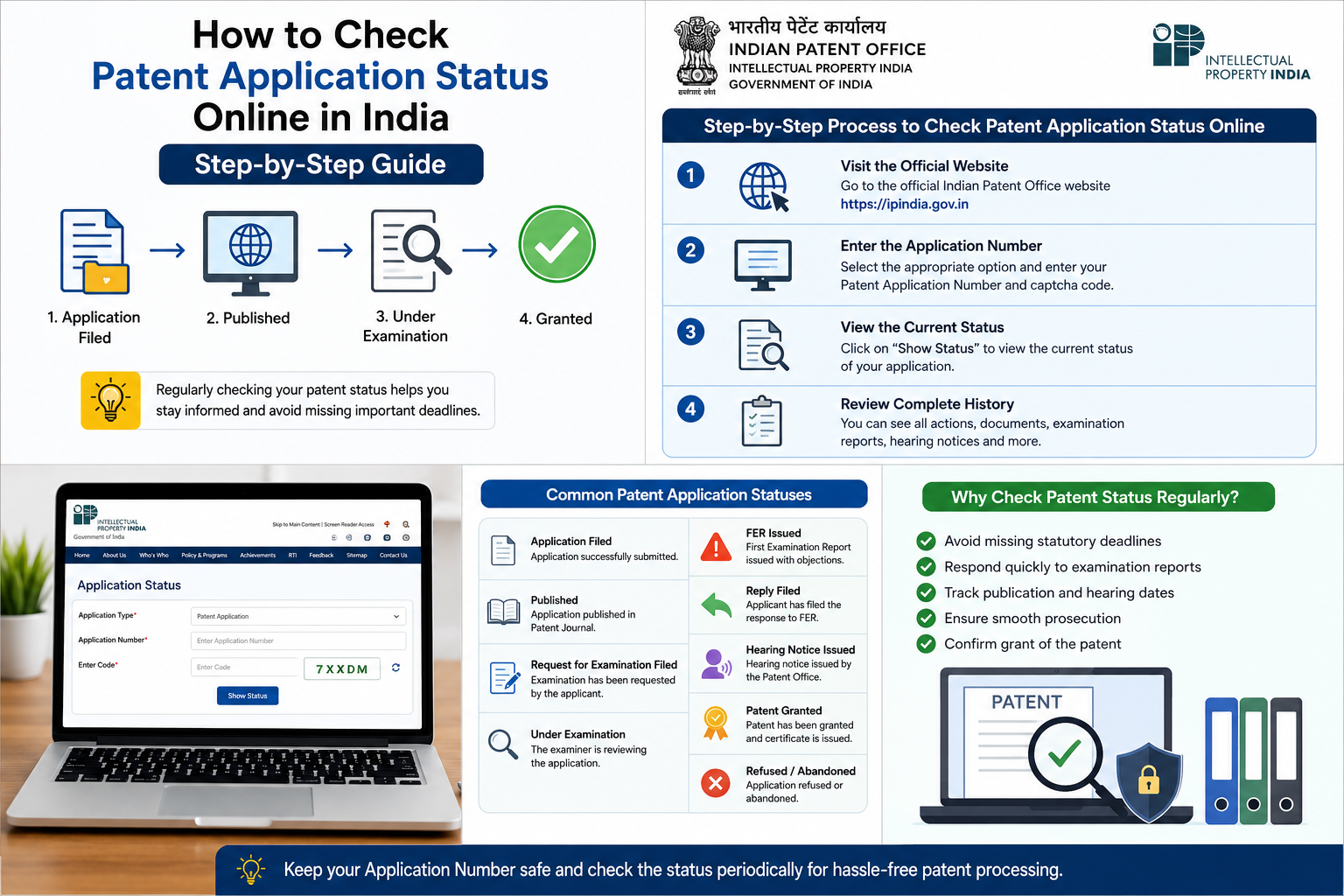
Step-by-Step Process to Check Patent Application Status Online
Step 1: Visit the Indian Patent Office Website
Open the official Indian Patent Office website.
Navigate to the Application Status section.
Step 2: Enter the Application Number
Select the appropriate application type.
Enter:
- Patent Application Number
- Captcha Code
Click Show Status.
Step 3: View the Current Status
The system will display details such as:
- Applicant Name
- Title of Invention
- Filing Date
- Application Number
- Current Status
- Latest Action
Step 4: Review Complete History
You can also view:
- Publication details
- Examination request
- FER issuance
- Hearing notices
- Responses filed
- Grant order
- Patent certificate (after grant)
Common Patent Application Statuses Explained
1. Application Filed
The patent application has been successfully submitted.
No examination has started yet.
2. Published
The application has been published in the Patent Journal.
Once published, the invention becomes publicly available.
3. Request for Examination Filed
The applicant has requested examination.
The application now enters the examination queue.
4. Under Examination
The Patent Examiner is reviewing the application.
The examiner checks:
- Novelty
- Inventive Step
- Industrial Applicability
- Patentability
5. FER Issued (First Examination Report)
The Patent Office has raised objections.
The applicant must file a reply within the prescribed time.
6. Reply Filed
The applicant has submitted a response to the First Examination Report.
The application proceeds for further review.
7. Hearing Notice Issued
If objections remain unresolved, the Controller may issue a hearing notice.
The applicant gets an opportunity to explain the invention.
8. Hearing Completed
The hearing has been concluded.
The Controller will pass an order after considering the submissions.
9. Patent Granted
Congratulations!
The patent has been granted.
The Patent Certificate becomes available.
10. Refused
The Controller has refused the application.
The applicant may explore appeal or other legal remedies where available.
11. Abandoned
The application has been abandoned due to reasons such as:
- Failure to respond within time
- Non-filing of examination request
- Non-compliance with legal requirements
How Long Does It Take?
The timeline varies depending on the type of application and examination process.
Typical stages include:
| Stage | Approximate Timeline |
|---|---|
| Filing | Same Day |
| Publication | Usually after 18 months (unless early publication is requested) |
| Examination | After Request for Examination |
| FER | Depends on examination queue |
| Grant | Varies based on objections and compliance |
Can Anyone Check Someone Else’s Patent Status?
Yes.
Patent applications that have been published can generally be searched online using the application number or publication details.
How to Download Patent Documents
The online system also allows users to access documents such as:
- Patent specification
- Claims
- Drawings
- FER
- Hearing notices
- Replies (where available)
- Grant certificate
- Publication details
Why Should You Regularly Check Patent Status?
Regular monitoring helps you:
- Avoid missing statutory deadlines
- Respond quickly to examination reports
- Track publication
- Know hearing dates
- Ensure smooth prosecution
- Confirm grant of the patent
Common Reasons for Delay
Patent examination may take longer due to:
- Large examination backlog
- Complex technology
- Multiple objections
- Incomplete documentation
- Delayed responses
- Hearings before the Controller
Tips for Patent Applicants
- Save your application number securely.
- Check the status periodically.
- Respond to examination reports within the prescribed time.
- Keep your contact details updated with the Patent Office.
- Maintain copies of all filed documents and acknowledgements.
Frequently Asked Questions (FAQs)
Is checking patent application status free?
Yes. The Indian Patent Office provides online status checking without any fee.
Can I check status using my name?
The application status portal generally requires the application number or other identifying details. Name-based searches may be available through patent search databases rather than the status portal.
What if my application shows “FER Issued”?
You should review the First Examination Report carefully and file a reply within the prescribed timeline.
What does “Patent Granted” mean?
It means the Patent Office has accepted the application and granted exclusive rights over the invention, subject to the Patents Act and applicable conditions.
How often should I check my application status?
It is advisable to check periodically, especially after filing a Request for Examination and after responding to any examination report.
Can I check the status of an international (PCT) application?
Yes, if it has entered the Indian national phase, you can track its status through the Indian Patent Office using the relevant application details.
Checking your patent application status online is an important part of the patent process. Regular monitoring helps applicants stay informed about publication, examination, objections, hearings, and grant, ensuring that important deadlines are not missed.
Whether you are an individual inventor, startup, researcher, or company, keeping track of your application can make the patent prosecution process smoother and more efficient.